WITT means “We’re in This Together.” When it comes to your health and well-being, we all have a role to play. At Costco, we’re committed to taking care of employees. That’s why we offer benefits to help you get the support and care you need at the right time. Your role is to get to know your benefits and use them wisely — WITT can help.
Take the WITT pledge at WITTpledge.com — It only takes a minute to sign up! Include your spouse or domestic partner so they can stay informed too.
Reminder:
After you pledge, take the 2026 Benefits Survey to share what you value most about your benefits. The deadline to complete it is January 31.
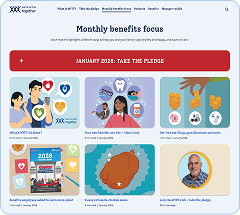
Watch for monthly WITT emails — You’ll get articles, videos and podcasts sent straight to your inbox. (Check other folders if they’re not in your main inbox.) See a sneak peek of this year’s WITT topics below.
Bookmark and explore WITTpledge.com — It’s your home for benefits resources that support your health and well-being. Browse anytime to see all that’s available to you and your family. See what you’ll find below.
Hear how other employees used their benefits — Check out past podcasts for personal stories on how employees overcame health challenges with the support of their benefits.
Why should I take the WITT pledge?
The WITT pledge connects you to your benefits so you can learn what’s available and use them to feel and be your best. It’s the best way to stay informed on all the benefits Costco offers to support your:
Physical well-being — Find preventive care and support for gut health, sleep, nutrition, exercise and more.
Emotional well-being — Manage your mental health, stress, anxiety and all of life’s challenges, including 8 free counseling sessions per issue, per year.
Financial well-being — Budget and save, reduce debt and plan for retirement.
Social well-being — Build healthy relationships at home, school, work and in the community.
Find what you need at WITTpledge.com
Your benefits are designed to support the health and physical, emotional, financial and social well-being of you and your family. Whether you want quick tips or a deep dive, there are plenty of ways to explore what’s available.
Bookmark the Benefits & resources page to browse benefits info anytime. You might be surprised by what you find that’s just right for you!
Sneak peek of WITT topics for 2026
January
Pledge to make the most of your benefits
February
Preventive care and heart health
March
Nutrition, gut and weight health
April
Financial and legal benefits
May
Mental health and sleep support
June
Women’s and men’s health
July
Alcohol, nicotine and prescription medication support
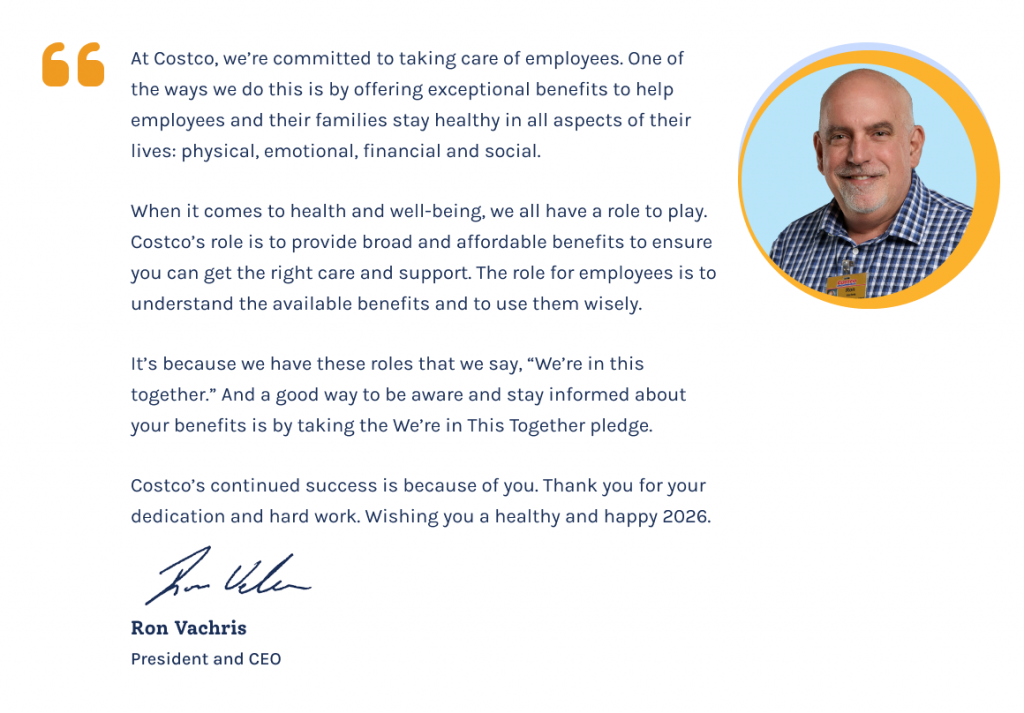
Thanks for all you do for Costco — read a message from Ron
As the year wraps up, we want to say thank you. Your hard work, heart and commitment continue to drive Costco’s success — and we couldn’t do it without you.
In 2025, more than 96,000 of you took the We’re in This Together (WITT) pledge to learn more about your benefits. You stayed informed through monthly texts and emails with helpful articles, podcasts and videos on topics such as:
Improving your nutrition and gut health through WeightWatchers and Cylinder
Supporting your mental health with free counseling sessions through Resources for Living®
Growing your money habits through SmartDollar® financial coaching and your T. Rowe Price retirement plan
Preparing for a new addition to your family with Unum’s bonding leave
And so much more
This is a powerful reminder of how much you care — not just about your work, but about your health and your future.
You also told us in the WITT pledge survey how much you loved hearing from each other. So, we increased our WITT podcasts from quarterly to monthly — 13 episodes this year! Each one featured real voices, real stories and real support from Costco employees.
Thanks for showing up, lifting each other up and continuing to grow. We’re in this together — and we’re grateful for every one of you.
Get ready to pledge next month
Explore your 2026 Benefits Guide now to make the most of your benefits in 2026! Every year brings new opportunities and new ways your Costco benefits can support you. Whether it’s your first time or you’ve pledged before, start fresh in January 2026. Include your spouse or domestic partner so you can both stay informed. It’s a simple way to stay connected to your benefits and make the most of what’s available.
The holidays are a time for celebrations. But winter can also bring sniffles, stress and seasonal illnesses. Colds, the flu and other viruses spread more easily this time of year — especially indoors and in close gatherings.
Here are some ways to protect your health and enjoy the season:
Drink water — Aim for 8 cups a day to stay hydrated and support your immune system.
Wash your hands often — Especially before eating or touching your face.
Stick to your sleep routine — Rest helps your body fight off germs.
Take breaks from stress — Quiet time with loved ones can boost your mood and well-being.
Get your flu shot — It’s your best defense and can reduce symptoms if you get sick.
Open a window — Fresh air helps reduce the spread of airborne viruses.
Your Costco benefits are here to support you — so you can focus on what matters most this season.
If you or a family member feels sick, use the 98point6® appto talk to a doctor in minutes — no appointment needed, no copay required. You can get care, prescriptions and advice without leaving home.
Need a primary care provider? Visit Costcobenefits.com and choose “Find a Doctor” under Health & Wellness.
If you need care while you’re away from home, Assist Americacan connect you with help for travel emergencies 24/7 when you’re 100 miles or more from home, anywhere in the world. Download the Assist America app and sign up before you leave home for quick access to help if you need it. Use reference number 01-AA-UN-762490 to enroll on the app.
One of the ways Costco helps employees save money is through reimbursement accounts from Inspira Financial™.
Watch this video or see the chart below for a quick overview and to see what’s changing. Remember, you must enroll or re-enroll if you want to participate in 2026.
Narrator: Your health and the health of your family is a top priority at Costco. That’s why we are committed to providing you and your family with affordable benefits that help you receive quality care whenever needed. One of those benefits are the reimbursement accounts available through Inspira Financial. Here’s everything you need to know about reimbursement accounts.
There are two types of reimbursement accounts available to you as a Costco employee: the HCRA and the DCAP. The HCRA, or Health Care Reimbursement Account, allows you to set aside pre-tax dollars to reimburse yourself for eligible medical expenses such as co-pays, deductibles and co-insurance, dental and vision expenses, prescriptions, and over-the-counter items. Annual enrollment is the only time you can enroll in an HCRA account, and the HCRA must be reelected every year if you want to continue your account.
The DCAP, or Dependent Care Assistance Plan, allows you to set aside pre-tax dollars to reimburse yourself for qualified child and elder care expenses necessary for you and your spouse to work. Funds can be used to pay for child care for your dependents age 12 and younger, or for a spouse, parent, or dependent incapable of self-care. Examples of DCAP expenses are things like daycare, before and after school care, nursery and preschool, and in-home aides. Please note that the DCAP cannot be used for dependent health care expenses.
You need to enroll in the DCAP every year to continue your account. However, you can enroll, change, or stop your enrollment whenever there is a qualifying change to your dependent care needs throughout the year. Both types of accounts are funded by automatic pre-tax payroll deductions from every paycheck. If you choose to enroll in one or both of the reimbursement accounts during annual enrollment, you’ll be prompted to choose how much money you would like to contribute for the plan year up to the annual limit. Each account has an annual funding limit set by the IRS.
Funds will then be deducted pre-tax from your paychecks and deposited into these reimbursement accounts. While you can access the full amount of your annual HCRA election beginning January 1, with the DCAP, you can only access the amount currently in your account at the time of your reimbursement request. If you enroll in the HCRA, you’ll have a few different ways to access your account. The default reimbursement method is autopay.
The HCRA autopay feature will automatically pay your portion of medical, dental, and vision claims, including co-pays, deductibles, and coinsurance. If you have specific plans for your HCRA funds, like paying for braces, be sure to turn off autopay at the start of each year on the Inspira website or app.
You’ll also receive a debit card you can use to pay for eligible expenses at these locations— Costco Pharmacy, Costco Online Pharmacy, Costco Optical, and the Costco Hearing Aid Center. You can check your available account balance on your Aetna member website. For the DCAP, you can submit a claim for reimbursement as soon as you have an eligible expense through the Inspira website or app. You’ll be reimbursed up to the current balance in your account.
Before you enroll, take a look at your health care and dependent care expenses for the previous year, and think about needs in the coming year to get a sense of how much you would like to contribute. Keep in mind that if you are currently enrolled in an HCRA, you’ll want to think about whether you’ll have funds left in your account at the end of this year that you can roll over into next year. It is important to remember that funds in both accounts are “use it or lose it” per IRS rules. Only a small portion of your HCRA balance can roll over into the next plan year. This amount is determined annually by the IRS.
Only participants who have an active HCRA as of December 31 are eligible for this rollover. Any funds beyond the rollover amount are forfeited after the claim filing deadline. This is why it’s so important to consider your anticipated expenses for the coming year before selecting a contribution amount for each account. If you have a larger amount in your DCAP account than you expected as the end of the plan year approaches, you can take advantage of the grace period. The DCAP offers a grace period at the beginning of the following year, where funds from the previous year can still be used.
Don’t forget to submit all your reimbursement claims by the filing deadline, as any funds left over after this period will be forfeited. Be sure to calculate your contributions carefully. And that’s the basics. If you have any questions or need more information, just visit Costcobenefits.com.
Thanks for watching. And remember, we’re in this together.
[♪ ♪ Upbeat Music]
Here’s a reimbursement accounts overview
Health Care Reimbursement Account (HCRA)
Dependent Care Assistance Plan (DCAP)
What it’s for
Out-of-pocket health care expenses for you, your spouse and eligible dependents —
Copays, deductibles and coinsurance, plus dental, vision, hearing aid and pharmacy expenses.
Dependent care expenses for you and your spouse —
Eligible elder or childcare costs so you and your spouse can work.
It can’t be used for dependent health care costs — that’s the HCRA.
2026 contribution limits
$120 up to $3,400
Up to $7,500 (or $3,750 if married and filing separately)
When funds are available
Your full annual election amount is available January 1.
Funds are available as they’re deducted from your paycheck.
How reimbursement works
Autopay — Your HCRA is set to automatically reimburse you for eligible copays, deductibles or coinsurance for medical, dental and vision expenses.
If you plan to use your funds for things like braces, be sure to turn off autopay at the start of the year on the Inspira website or app.
Debit card — Use it at a Costco Pharmacy, Costco Optical Department, Costco Hearing Aid Center and at the Costco Online Pharmacy.
Inspira website or app — You can submit a claim for reimbursement when you have an eligible expense.
Inspira website or app — You can submit a claim for reimbursement when you have an eligible expense.
You’ll be reimbursed up to the current balance in your account.
When to enroll
Enroll during Annual Enrollment.
Enroll during Annual Enrollment or during the year as your childcare needs change.
Election changes
Election changes are not allowed — so you won’t be able to start, stop or change your contributions after Annual Enrollment.
Start, change or stop your contributions as your qualifying childcare needs change.
Rollover
Unused funds that carry over to the next year (total amount is determined by the IRS each year)
Remaining balance of up to $660 automatically rolls over from 2025 to 2026.
No rollover
Grace period
When you can use leftover funds to pay for new expenses
No grace period
Use funds leftover at the end of the year on expenses during the grace period (January 1–March 15 of the following year).
Claim filing deadline
Last day to file claims for the previous year’s expenses
April 30 of the following year
April 30 of the following year
HCRA and DCAP funds are USE IT OR LOSE IT!
This means you forfeit any money left in your account after the claim filing deadline of April 30 of the following year. (Except for your HCRA rollover up to the IRS rollover maximum.)
Not sure how much to contribute?
If you usually meet your annual deductible, you could start with that amount. You won’t pay taxes on what you put in. HCRA funds can help cover your out-of-pockets costs for doctors’ visits, X-rays, lab work and more, while DCAP funds can pay for in-home aid and daycare.
Keep in mind that both HCRA and DCAP funds are “use it or lose it,” though a portion may roll over to the next year.
Autopay uses your HCRA funds automatically, unless you turn it off. You can adjust your contribution during Annual Enrollment each year. DCAP funds are a little different — you can change your contribution amount throughout the year, and you need to submit a claim for reimbursement. While you can enroll or make changes to your DCAP contribution amount during Annual Enrollment, you can also do so if your child- or eldercare needs change.
Want to know what’s changing for 2026? Watch this new video to find out. Changes include more free counseling sessions from Resources for Living®, an increased annual allowance for prescribed glasses and contacts, a new administrator for your pharmacy benefits and more. For all the changes, see your 2026 Benefit Plan Changes booklet.
Narrator: Narrator: Your health and the health of your family is a top priority at Costco. That’s why we are committed to providing you and your family with affordable benefits that help you receive quality care whenever needed.
In 2026, you will see enhancements and changes to your Costco benefits. Here are some key changes to know.
Let’s start with resources for living. Beginning January 1, 2026, we’re increasing the number of free counseling sessions you can get through RFL from six to eight, so you’ll have access to eight free sessions per issue per year. RFL is available to all employees on your hire date, all your household members and dependent children living away from home up to age 26.
You have a few different ways to find a therapist for your eight free counseling sessions. You can search on the RFL website for in-person or virtual therapy. Search by specialty, language, and more. You can connect with an RFL care partner by phone or webchat, or you can use Talkspace for text or video chat.
Now let’s talk about the emergency room copay on the Aetna medical plan. In 2026, the ER copay on the Aetna medical plan will change from $150 to $200 when you go to the ER. You also pay your deductible and coinsurance.
Keep in mind that the ER is for true emergencies only, such as serious or life-threatening conditions. Some examples are broken bones, difficulty breathing, or serious cuts and burns. If it’s not a true emergency but you need care right away, you have other, more convenient options.
Get virtual care via text with 98point6 for a $0 copay. If you want in-person care, you can search for in-network urgent care on the Aetna app or at Aetna.com.
Not sure if it’s an emergency? Call the 24-hour nurse line. They can also help you find in-network care near you.
Now let’s talk about the dental plan updates for mainland employees. Costco offers two dental plans– Network Dental and Choice Dental. Previously, Choice Dental was not available to employees who became eligible for benefits on or after January 1, 2020.
Starting in 2026, both Network Dental and Choice Dental will be available to benefit-eligible employees regardless of your eligibility date. If you’d like to change your dental plan, you can do so during annual enrollment or after a qualifying life event.
What’s the difference between the two dental plans?
Network Dental pays for covered dental care from in-network dental providers only. Choice Dental pays for covered dental care with dental providers both in and out of network. However, Network Dental offers higher maximum coverage at a lower cost per paycheck.
Choice Dental offers the added flexibility of out-of-network coverage, but you may pay more. And you can save even more by using an in-network dentist. You and your covered family members each earn a credit of $50 toward your medical deductible and coinsurance when you get your first dental cleaning each year with an in-network dentist.
If you’re enrolled in Choice Dental and get an out-of-network cleaning, you won’t be eligible for the credit. However, for the few locations that don’t have Network Dental, you can still earn the credit with in- and out-of-network dentists. Go to Costcobenefits.com for a list of these locations.
Want to find out which plan is right for you? View the 2026 Dental Changes video to learn more.
The Aetna app has a new digital experience. Some new features are enhanced search and chat features, care paths and program recommendations for your health needs, and Aetna Smart Compare Intelligent Matching to help you find quality and effective care.
Your top three matches will appear at the top of your search results. Download the Aetna health app or visit aetna.com to explore your personalized tools and resources.
Now let’s talk about changes to the Hawaii medical and dental plans. Hawaii offers two medical plans and two dental plans. Previously, the HMSA PPO medical plan and premium dental plan were not available to part-time Hawaii employees. Starting in 2026, both medical plans and both dental plans will be available to Hawaii employees regardless of your part-time or full-time status.
The HMSA HMO provides in-network coverage only. And you’ll need to get a referral from your primary care doctor to see a specialist. But you’ll pay a lower cost per paycheck. The HMSA PPO provides coverage out of network, and you don’t need a referral to see a specialist. But you’ll pay a higher cost per paycheck, and you may pay more for care.
Core Dental offers lower cost per paycheck. Premium Dental offers richer benefits at a higher cost per paycheck. See your 2026 Benefit Plan Changes booklet for more details.
Let’s talk about the pharmacy benefit update for mainland and Hawaii employees. On January 1, 2026, Navitus Health Solutions will replace Costco Health Solutions as your pharmacy benefits administrator. Your prescription drug coverage will stay the same. You can still use your employee ID to fill prescriptions at a Costco pharmacy, or you can use any network pharmacy.
Now let’s talk about reimbursement accounts available through Inspira Financial. In 2026, the health reimbursement account, or HCRA, maximum annual contribution is changing from $3,300 to $3,400 per year. The dependent care assistance plan maximum annual contribution is changing from $5,000 to $7,500 per year, or $3,750 if married and filing separately.
The HCRA lets you set aside pre-tax dollars to pay for eligible out-of-pocket health care expenses such as co-pays, deductibles, and coinsurance, dental, vision, and hearing aid expenses, and prescriptions and over-the-counter items. The DCAP lets you set aside pre-tax dollars to pay for eligible child and elder care expenses, such as daycare, before- and after-school care, and in-home aides.
You can enroll in reimbursement accounts during Annual Enrollment or for the DCAP when you have qualifying changes to your childcare needs during the year. Watch the 2026 Reimbursement Accounts video to learn more about the HCRA and DCAP.
You can also look forward to an increased annual allowance for vision hardware, such as glasses and contacts in 2026, from $175 to $200. Keep in mind that you don’t have to use it all at once, but you do need to use your allowance by December 31 each year. Schedule your annual eye exam with your Costco optical department now to beat the end-of-the-year rush on vision.
New in 2026– employees enrolled in the Aetna medical plan will have access to sleep apnea support from GEM Sleep. GEM Sleep is available through Sleepio. Don’t ignore the snore. Beginning January 1, 2026, you can take an at-home sleep test from the comfort of your own home.
GEM Sleep is in network with Aetna medical plan, so your plan cost shares apply. That may include co-pays, deductible, or co-insurance.
As a reminder, employees and their family members age 18 plus enrolled in a Costco medical plan can still access the Sleepio Digital Sleep Improvement Program at no cost. Sleepio is clinically proven to help you clear your mind, get better sleep, and have better days in just six weeks.
To learn more about 2026 benefits changes, see your benefit plan changes booklet. Your new benefits are effective starting January 1, 2026. If you have any questions or need more information, visit Costcobenefits.com. Thanks for watching. And remember, we’re in this together.
[♪ ♪ Upbeat Music]
Changes that take effect on January 1, 2026
Resources for Living®
8 free counseling sessions (up from 6) per person, per issue, per year
The ER copay on the Aetna® medical plan will change from $150 to $200. Deductible and coinsurance still apply. If it’s not a true emergency, you have other options for care, such as 98point6 virtual care for a $0 copay.
Aetna Dental® plan change (Mainland only)
Both Network Dental and Choice Dental will be available to all benefit-eligible employees regardless of your eligibility date.
Network Dental has a higher annual and orthodontia benefit with a lower cost per paycheck. The plan pays for covered dental care with in-network providers only.
Choice Dental has a lower annual and orthodontia benefit with a higher cost per paycheck. The plan offers a reduced benefit for dental care with an out-of-network provider.
Aetna Dental® incentive change (Mainland only)
You and your covered family members can each earn a $50 credit toward your medical deductible and coinsurance when you get your first in-network dental cleaning each year. If you’re enrolled in Choice Dental and get an out-of-network cleaning, you won’t be eligible for the credit.
For locations that don’t have Network Dental, you can still earn the credit with in- and out-of-network dentists. Go to Costcobenefits.com for a list of these locations.
Aetna digital update (Mainland only)
New Aetna digital experience, including:
Enhanced search and chat features
Care Paths and program recommendations for your health needs
Aetna Smart Compare® Intelligent Matching to help you find quality and effective care, with your 3 best matches appearing at the top of your provider search results
Hawaii medical and dental plan changes (Hawaii only)
Both HMSA medical plans and dental plans will be available to Hawaii employees, regardless of your part-time or full-time status:
HMSA HMO provides in-network coverage only, and you’ll need to get a referral from your primary care doctor to see a specialist. But you’ll pay a lower cost per paycheck.
HMSA PPO provides coverage out-of-network, and you don’t need a referral to see a specialist. But you’ll pay a higher cost per paycheck, and you may pay more for care.
Core Dental has lower payroll contributions for a lower annual and orthodontia benefit.
Premium Dental has higher payroll contributions for a higher annual and orthodontia benefit.
Pharmacy change to Navitus (Mainland and Hawaii)
Navitus Health Solutions will replace Costco Health Solutions as your pharmacy benefits administrator. Your prescription drug coverage will stay the same. You can still use your employee ID to fill prescriptions at a Costco Pharmacy, and you can still use any network pharmacy for first-time fills.
Reimbursement account limit changes (Mainland and Hawaii)
HCRA — You can now contribute more each year to your Health Care Reimbursement Account — up to $3,400.
DCAP — You can now contribute more each year to your Dependent Care Assistance Plan — up to $7,500 (or $3,750 if you’re married filing separately).
To learn more about reimbursement accounts, click here.
Vision hardware allowance change
The annual allowance for prescribed eyewear (glasses and contacts) is increasing from $175 to $200. You don’t have to use it all at once, but you do have to spend it by December 31 each year.
GEM Sleep for sleep apnea (Mainland only)
Employees enrolled in the Aetna medical plan will have access to sleep apnea support from GEM Sleep, available through Sleepio.
GEM Sleep makes it easy to get a diagnosis from home. Based on your evaluation, you’ll get treatment options — like CPAP — and support to get started. Plan cost shares like copays, deductible and coinsurance apply.
Find all the details in your 2026 Benefit Plan Changes booklet.
Visit the enrollment website at Costcobenefits.com to complete the Annual Enrollment process, November 1–25.
Video: 2026 Annual Enrollment instructions November 1–25, 2025
Annual Enrollment takes place November 1–25. It’s your time to review and choose the coverage that fits your needs, whether you’re a longtime employee or you just became eligible for benefits. Watch this short video for everything you need to know about the 2026 Annual Enrollment process.
Narrator: Your health and the health of your family is a top priority at Costco. That’s why we are committed to providing you and your family with affordable benefits that help you receive quality care whenever needed. Now that Annual Enrollment is here, we want to make sure you understand the benefits available to you and your family and why this time is so important. Here’s everything you need to know about Annual Enrollment.
Annual Enrollment is the time of year that benefit eligible employees have the opportunity to make changes to their benefit elections for the upcoming calendar year. You can add or drop coverage for yourself or family members, change your existing plans, and explore the benefits available to you and your family in the coming year. By now, you should have received a kit in the mail that includes everything you need to enroll in Costco benefits. This includes things like the benefit plan changes booklet and information about how to log on to costcobenefits.com and start the Annual Enrollment process.
If you have not received a kit yet, that’s totally fine. All of the information in the kit can be found on costcobenefits.com, where you can also sign up for text reminders about Annual Enrollment so you don’t miss a step of the process. We’ve done our best to make the Annual Enrollment process easy. Beginning in November, you can click on the Annual Enrollment banner or the enrollment website tile on costcobenefits.com to start the process.
Once you’ve selected your benefits and your submitted documentation has been approved for any new dependents, your benefits will go into effect on January 1. If your spouse or domestic partner is enrolled in your benefits, you will need to complete the dependent verification process each year to continue their coverage, even if you don’t make any changes. If you don’t, their coverage will end on December 31 of this year. If you have dependent children enrolled in your benefits, you’ll need to review and remove any dependent children who are no longer eligible.
Coverage will continue automatically for eligible enrolled children. If you add any family members to your plan, you must submit required documentation by November 30. When you begin the annual enrollment process, the platform will automatically remind you to verify your spouse or domestic partner. Annual enrollment is also a great time to ensure that your beneficiaries are up-to-date for your life and AD&D insurance and retirement plans.
Designating your beneficiaries for these plans is critical so you can ensure that the right people receive this benefit when the time comes. You can update your beneficiaries for life and AD&D insurance online while you go through the annual enrollment process. To update beneficiaries for your retirement plans, just visit RPS.TRowePrice.com.
As a reminder, if you want to participate in the HCRA or DCAP, you must enroll during annual enrollment even if you are already enrolled for the current plan year. All your other benefit elections will continue into the following year if you don’t make any changes.
And that’s the basics. Annual Enrollment begins and ends in November, so be sure to enroll early. If you have any questions or need more information, just visit costcobenefits.com or call the Enrollment Center at 800-541-6205. Thanks for watching. And remember, we’re in this together.
[♪ ♪ Upbeat Music]
Make sure you don’t miss any of these key actions
Log in at Costcobenefits.com and select the enrollment website to get started.
Complete Dependent Verification for your spouse or domestic partner. Otherwise, their coverage will end on December 31, 2025.
Review your current benefits elections to see if you need to make any changes. • Watch the 2026 Benefits Changes video so you can make informed decisions about your benefits.
Add or remove dependents who are no longer eligible. Eligible children will stay covered. If you add any family members, you must submit required documentation by November 30 to receive approval for their coverage to be active on January 1, 2026.
Enroll or re-enroll in the Health Care Reimbursement Account (HCRA) and/or Dependent Care Assistance Plan (DCAP) to help you save on care. Elections don’t carry over year to year.
Review your beneficiaries. Be sure to add or update any beneficiaries as needed. • For Life/AD&D insurance: Enrollment website • For the retirement plan: RPS.TRowePrice.com
A good night’s sleep is one of the best things you can do for your physical and mental health. But if you’re like a lot of Costco employees, you may have a varying work schedule, and may not have the same start and end to each day. That can make it harder to fall asleep — and stay asleep — night after night. This can take a toll on your body and mind, putting you at risk for mental health issues, obesity, diabetes and heart disease. Your new free benefitSleepio can help.
Sleepio is a six-week guided online program for better sleep. It’s tailored to you and simple to use. Clinical studies have shown the program improves the sleep of those who use it.
Click the link in the confirmation email you receive to download the Sleepio app and create your account
Note: Make sure you start the process by registering on the Sleepio website. There are two Sleepio apps, and the link in the confirmation email will send you to the right one.
Here’s how it works:
You start by taking an in-app baseline sleep quiz to determine your sleep habits and challenges.
You then get access to a personalized care plan.
In just 5 minutes a day, you’ll learn effective ways to get better sleep, including a wind-down routine, relaxation exercises and ways to calm your thoughts.
You’ll better understand why you have sleep problems, what makes them worse and how to get back to better sleep for good.
Sleepio is available at no cost to you and your family members age 18 or older enrolled in a Costco medical plan. Get help to clear your mind, get better sleep and have better days in just six weeks. Learn more at sleepio.bighealth.com/Costco.
4 tips for more zzzzzzs
Eat healthy. A varied diet with plenty of vitamins, minerals and antioxidants makes a major contribution to your immune system, overall health – and sleep. Dietitians recommend 3-5 servings of different fruits and vegetables each day.
Power down. Avoid cell phones, TVs and computers in the hour or two before bedtime. Limit caffeine to the start of your day.
Establish a bedtime routine. Take a warm shower or bath. Listen to calming music. Having a routine helps condition your mind and body for sleep.
Protect your time and energy. Trying to do too much or be everything to everyone can cause stress and anxiety and affect your sleep. Set boundaries if you’re over-extended and make time to unwind and do the things you enjoy.
More than 40,000 Costco employees and family members are living with gut health issues. Many have been suffering in silence. Poor gut health can take a toll on your physical and mental health. But there’s help. Join the 13,000+ who have started using Cylinder*, your free digestive health program.
Your gut microbiome is the community of “good” and “bad” bacteria that live inside your stomach and intestines. They help you digest food, fight off germs and maintain a healthy weight. If your body doesn’t have enough good bacteria, bad bacteria can thrive, causing a range of health issues:
Digestive issues
Skin conditions
Mental health issues
Other health problems
Bloating/gas
Eczema
Anxiety
Headaches
Constipation
Psoriasis
Depression
Fatigue
Diarrhea
Rosacea
Mood swings
Joint pain
Heartburn
Acne
Inflammation
Irritable Bowel Syndrome (IBS)
Rheumatoid arthritis
Food sensitivities
Allergies
Cylinder: Learn about your gut health
Cylinder, your no-cost digestive health benefit, offers:
A free at-home GutCheck microbiome health test to measure the good and bad bacteria in your gut
Access to a team of experts, including a registered dietician and health coach, who can help you identify triggers and find symptom relief
Sign up at Go.CylinderHealth.com/Costco(access code: Costco) or call 888‑246‑5019. The program is available at no cost to employees and dependents age 18+ enrolled in a Costco medical plan. No diagnosis is needed to get started.
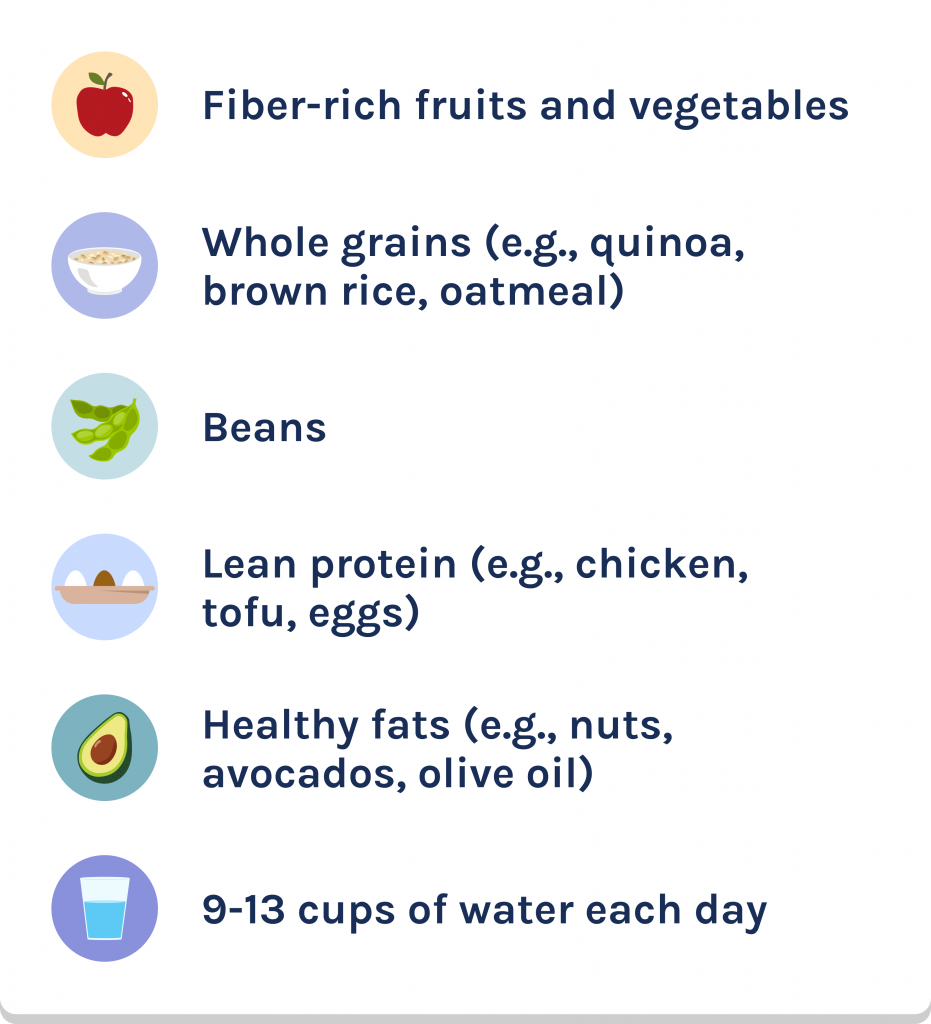
Foods that can help
When you feed your body, you’re also feeding the bacteria that live in your gut, helping them thrive. As a general rule, they’re healthy eaters. Try adding more whole foods to your diet and make sure you stay hydrated.
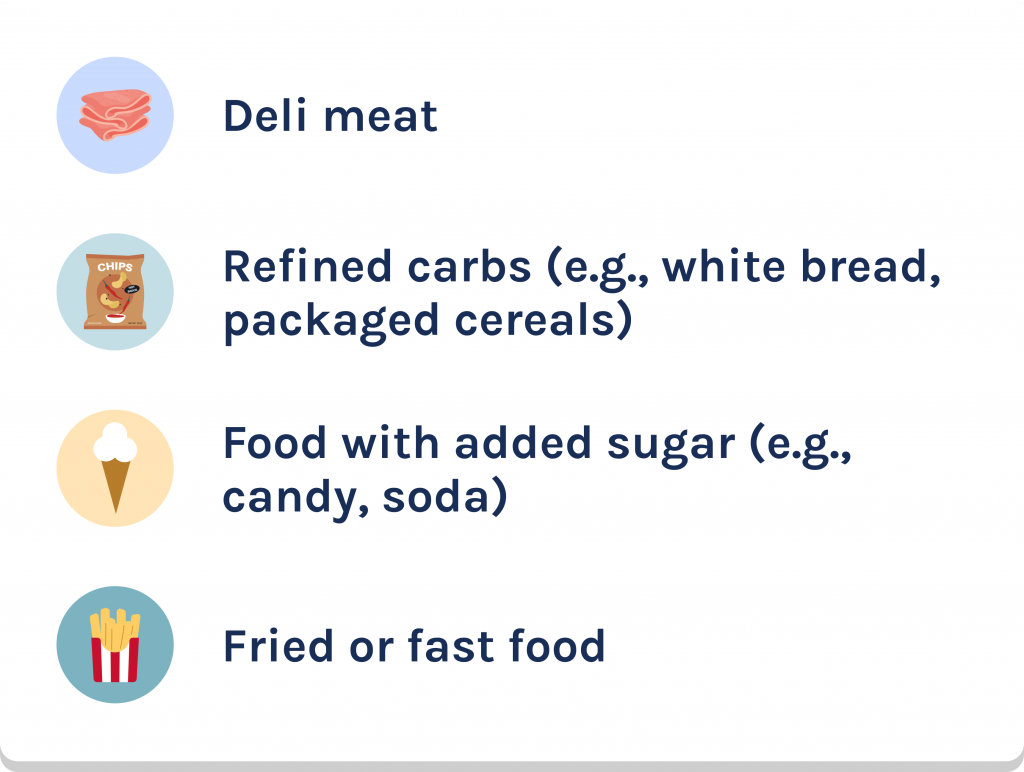
Foods that can hurt
As much as possible, try avoiding processed foods, such as:
Did you know? Cylinder can also help with colorectal cancer prevention by getting you ready for screenings, navigating appointments and helping you make lifestyle changes that can prevent cancer. Get started today.
How often have you heard “you are what you eat”? That’s because what you eat has such a big impact on your physical and mental health. Listen to these Costco employees as they share their experience with Cylinder*, the new free digestive health program.
Tony, and I’ve been a part of Cylinder for about 2 months.
I’m gluten free, so I gotta stay away from gluten or else I get arthritic pain in my hands and around my body.
Well, I met with my health coach. He’s fantastic.
And then the behavioral therapy. My son, he’s got a panic disorder. That can really, really help with him.
Okay. I feel better overall. The app is, and, and the health coach, has really helped with being mindful.
I have more energy. I think I’m happier.
And I’ve even gotten compliments from members at work.
This is amazing that they’re, they’re recognizing this as a way to get healthy.
+
Show transcript
–
Hide transcript
Darren and I think we’re going on 2 months.
I mean, I’ve always had a little bit of acne, you know. Especially as a 60 year old guy, I didn’t, you know, I didn’t think I should have acne anymore, but, so I thought, well, okay, maybe it is something to do with my eating. Then I got a little rosacea on my forehead about 6 months ago.
The actual western medicine doesn’t really have anything for it. And, you know, none of it seems to help. And everybody I know that’s had it, has it. You know, they can’t seem to get rid of it. So I thought, alright. I’m gonna try more of a holistic attempt. And I wanted to start eating better, and I thought Cylinder was kind of a nice way to do that.
The last couple of weeks, the redness has diminished. But the people from Cylinder, they’re amazing. My diet’s certainly better now than it was 2 months ago. There’s so many people at work that I know struggle with this. You know, if there was some way to reach some of these people, they would really benefit from it.
Cylinder is available now
Order your free gut microbiome health test with Cylinder, your free digestive health program. Learn about the good and bad bacteria in your gut, then connect with a registered dietitian and health coach to identify triggers that cause gut issues to help relieve your symptoms.
Catch conditions early when they’re easier to treat
Skin cancer and breast cancer are the two most common cancers among Costco employees. More than 6,000 employees and their family members are dealing with skin cancer. Nearly 1,800 have been diagnosed with breast cancer. Find out how you can catch these conditions early, when treatment is most effective.
Preventive services such as annual physical exams and mammograms are powerful weapons in fighting these cancers. A recent study shows that regular mammograms reduce the risk of dying from breast cancer by 50%.1 Only 21% of Costco employees and family members get all of their recommended preventive services each year. Are you up to date on your preventive care?
Routine preventive care helps you stay ahead of illness and disease so you can be your best. Preventive care includes services such as your annual physical, certain blood tests, cancer screenings and vaccines, even dental cleanings and vision exams. This kind of care helps you and your doctor know how you’re doing. Most importantly, it can catch a health condition in its earliest stages, when it’s easier to treat.
How to find a PCP
Employees and their family members enrolled in a Costco medical plan can find an in-network primary care provider by visiting Costcobenefits.com and clicking “Find a Doctor” under Health & Wellness.
Mainland employees can learn more about how to find the PCP that’s right for them in this Aetna ID card update:
Aetna ID card update for mainland employees
To make it easier for you and your family members enrolled in an Aetna medical plan to access preventive care, your new Aetna ID card will have a PCP listed for you and each family member.
Here are a few other things to know:
Your plan hasn’t changed. It’s not an HMO. You are not required to see the PCP on your ID card and your plan doesn’t require a referral to see a specialist.
Your PCP was carefully selected. If you’ve seen a PCP in the last two years, we’ve added the most recent PCP or practice name to your card.
If you haven’t, we looked for PCPs accepting new patients within 25 miles who have met the Aetna Smart Compare® high standards for care.
You can change your PCP at any time, and as many times as you need, by calling your Aetna Health Concierge* at 800-814-3543 (TTY: 711).
If you change your PCP, we’ll send you a new card. Your digital ID card will be available on your Aetna member website the next day.
Note: If you see a physician’s assistant (PA) or nurse practitioner (NP), you may see the supervising physician’s name or the practice name on your card.
Your PCP is your partner in good health
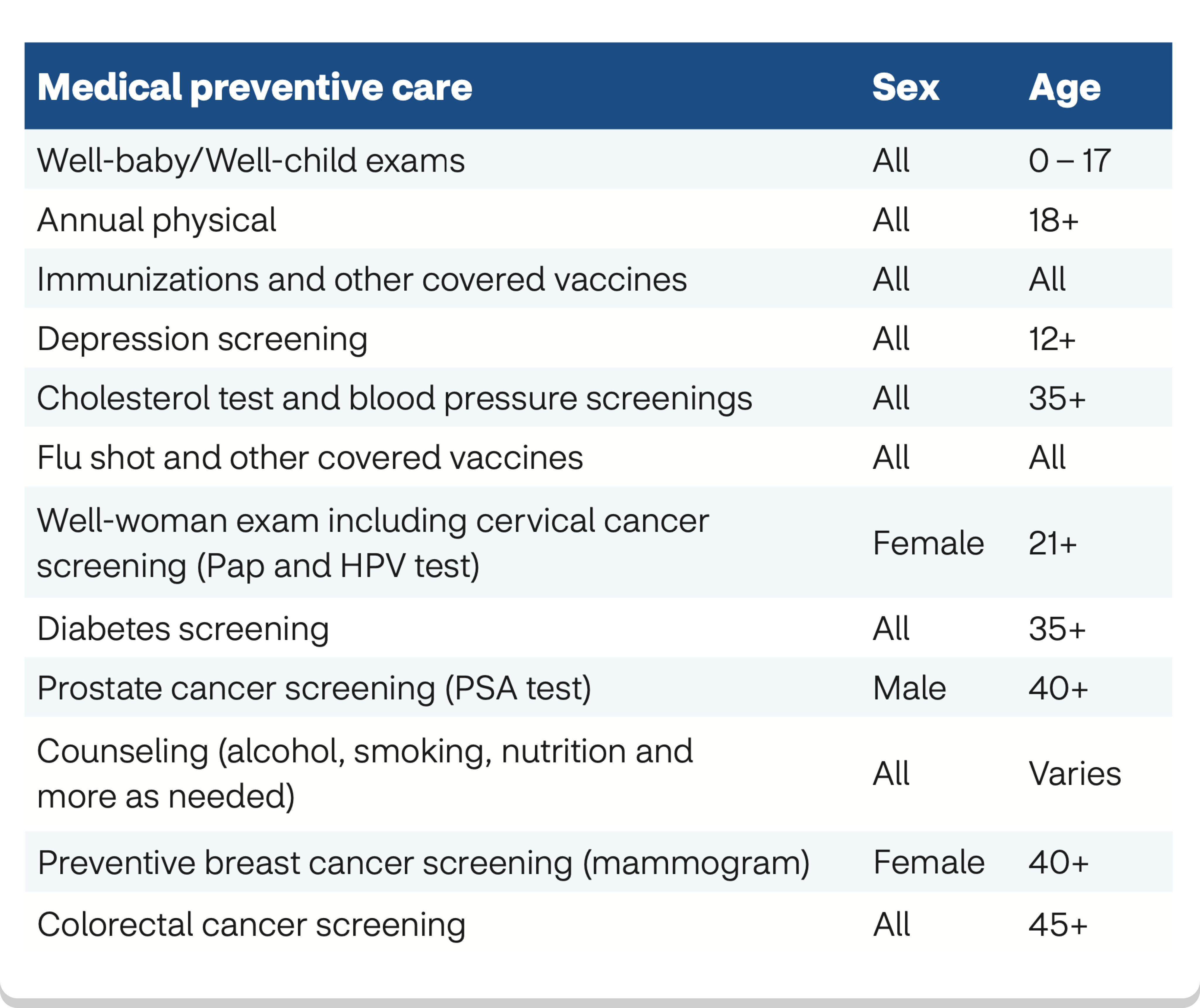
Your primary care physician (PCP) is your first stop for preventive care. They can give you your annual physical and order blood work, tests and screenings.
Here are some recommended preventive services. Your age, gender, and family and personal medical histories can make a difference in which services you need and when to start them. Ask your doctor what’s right for you.
Don’t forget about dental and vision exams
Learn more about what regular dental care can do for you here.
It’s important to get an annual eye exam, even if you have perfect 20/20 vision. Eye exams can help catch brain tumors, cancer, heart disease and more. In 2024, over 100,000 Costco employees and family members got their annual eye exam. Nearly 3,400 discovered a condition they didn’t know about, giving them the opportunity to seek care. The most common conditions were:
High blood pressure or cholesterol
Diabetes
Cataracts
Glaucoma
Employees and their family members enrolled in a Costco medical plan are automatically enrolled in vision coverage.
The plan will pay:
Up to $80 for your annual refractive eye exam
$175 toward the purchase of prescribed eyewear every year (you don’t have to spend it all at once)
You also get $1,750 toward the purchase of prescribed medically necessary hearing aids every four years.
Protect your health by quitting tobacco or nicotine for good
If you use tobacco and/or nicotine, think about making this your year to quit. The Costco Tobacco & Nicotine Cessation Program can provide the support you need with a plan personalized for you. You’ve got so much to gain once you stop smoking, using tobacco or vaping, including:
A lower risk for heart attack and certain cancers
Improved blood flow
Better lung function
A lower risk for gum disease, tooth loss, dry eye syndrome and cataracts
And that’s just a start. Imagine climbing stairs or playing with the kids and not being out of breath. Even food tastes better! Visit Costcobenefits.com and click “Quit Tobacco” under Health & Wellness to start your journey to quitting for good.







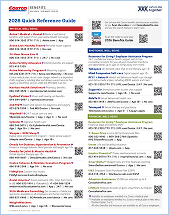
 Get familiar with these helpful resources: